# Stable Diffusion with Civitai

## Try it in the Widget Center

Click this [url](https://app.myshell.ai/robot-workshop/widget/1779862419876704256) to try this widget and copy the Pro Config template.

## Usage

Based on your description (text prompt), generate image with various sizes and styles

**Input Parameters**

<table><thead><tr><th>Name</th><th>Type</th><th>Description</th><th>Default</th><th data-type="checkbox">Required</th></tr></thead><tbody><tr><td>model</td><td><code>string</code></td><td>The model id from civitai (SD1.5, SDXL 1.0, PlaygroundV2). How to get it? Click on a model page on civitai, and copy the series number within the download link.</td><td>64094</td><td>true</td></tr><tr><td>prompt</td><td><code>string</code></td><td>The text prompt for image generation. Add lora? add &#x3C; lora:$id:$weight > to your prompt. `$id` is the series number and `$weight` is the lora weight you want (always set to 1.0). You can use multiple loras.</td><td></td><td>false</td></tr><tr><td>negative_prompt</td><td><code>string</code></td><td>The negative prompt for image generation.</td><td>(worst quality, low quality:1.4),(malformed hands:1.4),(poorly drawn hands:1.4),(mutated fingers:1.4),(extra limbs:1.35),(poorly drawn face:1.4),bad leg,strange leg, poor eyes, full screen of face</td><td>false</td></tr><tr><td>sampler</td><td><code>string</code></td><td>Sampler for diffusion model inference</td><td>DPM++ 2M</td><td>false</td></tr><tr><td>height</td><td><code>integer</code></td><td>Height of the generated images</td><td>512</td><td>false</td></tr><tr><td>width</td><td><code>integer</code></td><td>Width of the generated images</td><td>512</td><td>false</td></tr><tr><td>steps</td><td><code>integer</code></td><td>Steps for sampler to step whle sampling</td><td>25</td><td>false</td></tr><tr><td>cfg_scale</td><td><code>number</code></td><td>Classifier Free Guidance Scale - how strongly the image should conform to prompt - lower values produce more creative results. Default to 7.</td><td>7.0</td><td>false</td></tr><tr><td>seed</td><td><code>integer</code></td><td>Random seed for generation process. -1 means random seed</td><td>-1</td><td>false</td></tr><tr><td>clip_skip</td><td><code>integer</code></td><td>Early stopping parameter for CLIP model; 1 is stop at last layer as usual, 2 is stop at penultimate layer, etc.</td><td>1</td><td>false</td></tr></tbody></table>

**Output Parameters**

| Name | Type     | Description                                                                                                  | File Type |
| ---- | -------- | ------------------------------------------------------------------------------------------------------------ | --------- |
| url  | `string` | The url of generated image, stored in the cloud. Only temporarily effective, will be cleared in a few hours. | `image`   |

**Output Example**

{% tabs %}
{% tab title="success" %}
{% code fullWidth="false" %}

```json
{
  "url": "https://image.myshell.ai/image/chat/embed_obj/40295/20240423/8cf3621c509f4235839f1014b3ff97a4.jpg"
}
```

{% endcode %}
{% endtab %}

{% tab title="fail" %}
{% code fullWidth="false" %}

```json
throw a Http error.
```

{% endcode %}
{% endtab %}
{% endtabs %}

## Detailed Guidelines

* Main parameter:
  * `model`
    * The model id from civitai (SD1.5, SDXL 1.0, PlaygroundV2).
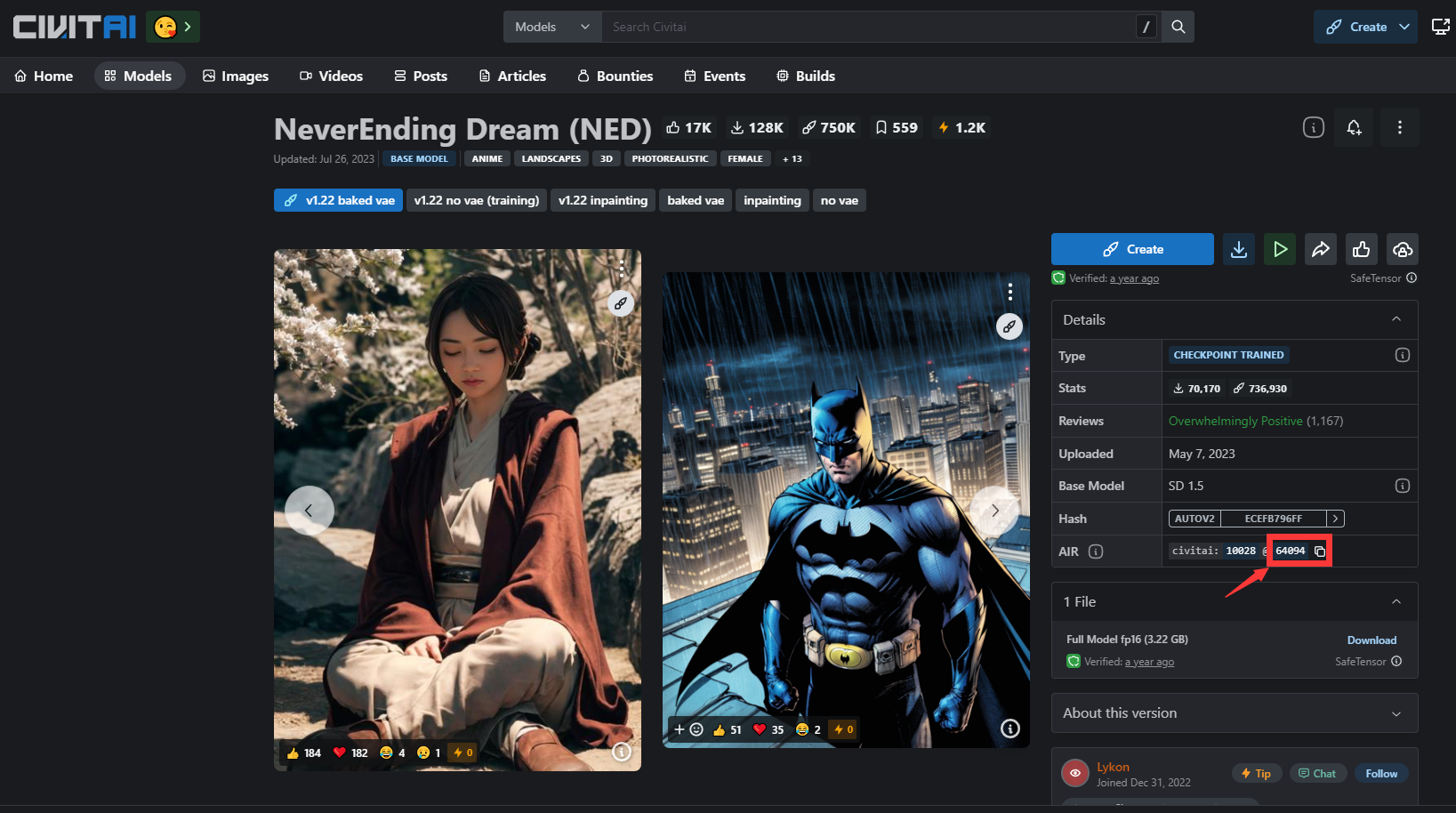
    * `How to get it?`

      * Click on a model page on civitai, and copy the version ID from the page.

      <figure><img src="/files/RWxmgLvaLVXuxjgwEXai" alt=""><figcaption></figcaption></figure>

      * Example: <https://civitai.com/models/10028?modelVersionId=64094> , use `model = 64094` for this model
  * `prompt`
    * The text prompt for image generation.
    * `Add lora?`

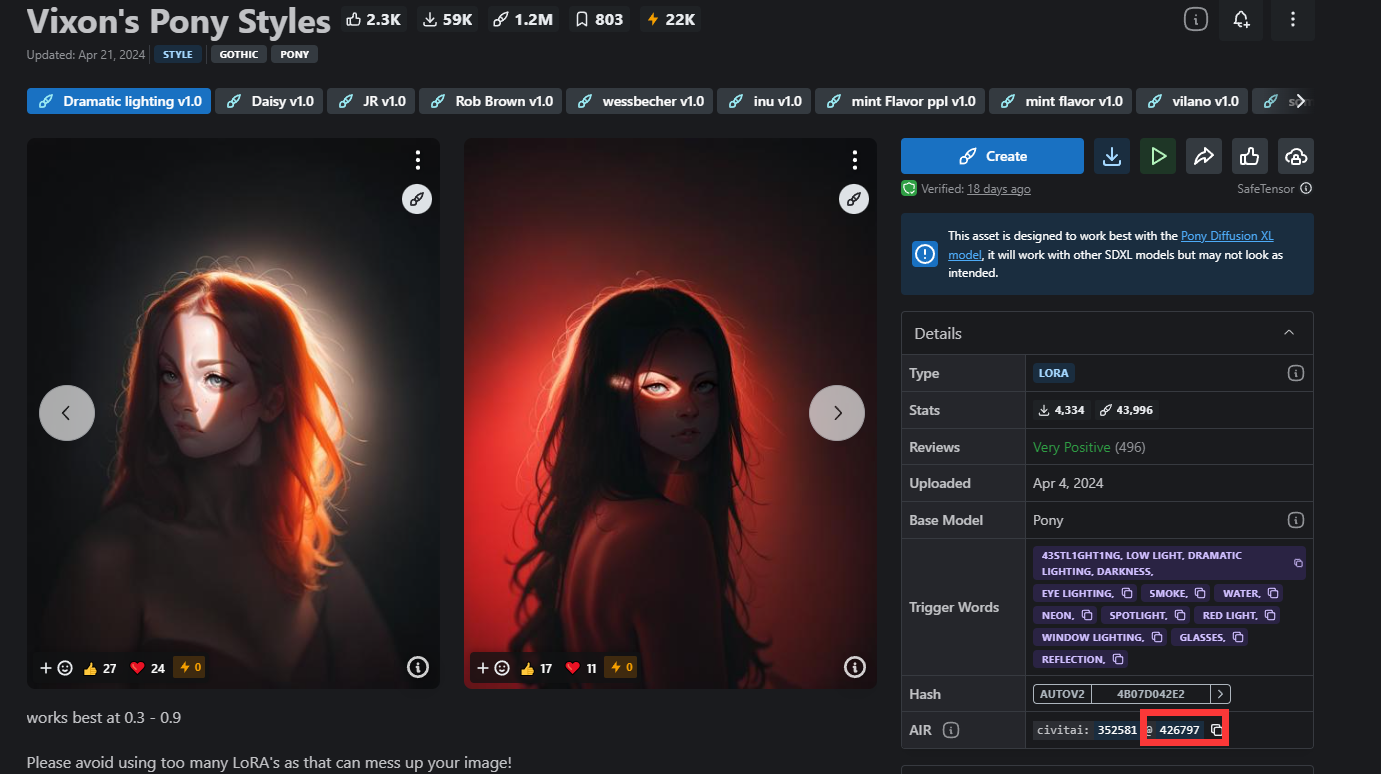
      * add `<lora:$id:$weight>` to your prompt. `$id` is the series number and `$weight` is the lora weight you want (always set to 1.0). You can use multiple loras.

      <figure><img src="/files/Gb6jTisSNv3aDdrqUqP4" alt=""><figcaption></figcaption></figure>

      * Example: `<lora:426797:1> A young boy is seated on the ground.`
        * Here, we add `lora=426797` with weight 1 for this generation guided by text `A young boy is seated on the ground`
  * `height & width`
    * The resolution for your generated images.
      * We recommend to generate 512 \* 512 images with SD 1.5 and 1024 \* 1024 images with SDXL 1.0
* Other functional parameter:
  * `enable_hr`: Enable the post-process high resolution. If it is set to false, please ignore the parameter with prefix `hr_`
    * `hr_upscaler`: Model for first step super resolution:
      * Choose from `["None", "Lanczos", "Nearest", "ESRGAN_4x", "LDSR", "R-ESRGAN 4x+", "R-ESRGAN 4x+ Anime6B", "ScuNET GAN", "ScuNET PSNR", "SwinIR 4x"]`
    * `hr_scale` : Improve the image quality by enlarging it in a way while maintains the original ratios. Default to 2.
      * For example, when `enable_hr=True` and `hr_scale=2` , you generated image will be `(2*width, 2*height)`
      * If `hr_height` or `hr_width` is set to a value other than zero, this parameter will be ignored.
    * `hr_resize_x` and `hr_resize_y` : Resize width/height to.
      * 0 means not defined. If x set to 0, and y is not 0, we will resize the length of image to y and change width accordingly. Vice versa
      * For example, when `enable_hr=True` and `hr_resize_x=1024` , and you set the `width=512` to obtain an image with 512 pixels on width. Finally you will get a image with `(1024, 1024/512 * height)`
    * `hr_second_pass_steps`: Steps of sampling for second pass of diffusion model after hires. Set to 0 means the same steps as first pass.
      * Feel free to use 0 for most cases.
    * `hr_denoising_strength`: Strength of image transfomation during hires transform. High means more influence during second pass sampling after hires
      * The weighted sum will be computed based on the images after super-resolution and after the second inference
      * Set 0.7 for default.


---

# Agent Instructions: Querying This Documentation

If you need additional information that is not directly available in this page, you can query the documentation dynamically by asking a question.

Perform an HTTP GET request on the current page URL with the `ask` query parameter:

```
GET https://docs.myshell.ai/ko/create/pro-config-mode/api-reference/widgets/1-stable-diffusion-with-civitai.md?ask=<question>
```

The question should be specific, self-contained, and written in natural language.
The response will contain a direct answer to the question and relevant excerpts and sources from the documentation.

Use this mechanism when the answer is not explicitly present in the current page, you need clarification or additional context, or you want to retrieve related documentation sections.