# Stable Diffusion with Civitai

## Try it in the Widget Center

Click this [url](https://app.myshell.ai/robot-workshop/widget/1779862419876704256) to try this widget and copy the Pro Config template.

## Usage

Based on your description (text prompt), generate image with various sizes and styles

**Input Parameters**

<table><thead><tr><th>Name</th><th>Type</th><th>Description</th><th>Default</th><th data-type="checkbox">Required</th></tr></thead><tbody><tr><td>model</td><td><code>string</code></td><td>The model id from civitai (SD1.5, SDXL 1.0, PlaygroundV2). How to get it? Click on a model page on civitai, and copy the series number within the download link.</td><td>64094</td><td>true</td></tr><tr><td>prompt</td><td><code>string</code></td><td>The text prompt for image generation. Add lora? add &#x3C; lora:$id:$weight > to your prompt. `$id` is the series number and `$weight` is the lora weight you want (always set to 1.0). You can use multiple loras.</td><td></td><td>false</td></tr><tr><td>negative_prompt</td><td><code>string</code></td><td>The negative prompt for image generation.</td><td>(worst quality, low quality:1.4),(malformed hands:1.4),(poorly drawn hands:1.4),(mutated fingers:1.4),(extra limbs:1.35),(poorly drawn face:1.4),bad leg,strange leg, poor eyes, full screen of face</td><td>false</td></tr><tr><td>sampler</td><td><code>string</code></td><td>Sampler for diffusion model inference</td><td>DPM++ 2M</td><td>false</td></tr><tr><td>height</td><td><code>integer</code></td><td>Height of the generated images</td><td>512</td><td>false</td></tr><tr><td>width</td><td><code>integer</code></td><td>Width of the generated images</td><td>512</td><td>false</td></tr><tr><td>steps</td><td><code>integer</code></td><td>Steps for sampler to step whle sampling</td><td>25</td><td>false</td></tr><tr><td>cfg_scale</td><td><code>number</code></td><td>Classifier Free Guidance Scale - how strongly the image should conform to prompt - lower values produce more creative results. Default to 7.</td><td>7.0</td><td>false</td></tr><tr><td>seed</td><td><code>integer</code></td><td>Random seed for generation process. -1 means random seed</td><td>-1</td><td>false</td></tr><tr><td>clip_skip</td><td><code>integer</code></td><td>Early stopping parameter for CLIP model; 1 is stop at last layer as usual, 2 is stop at penultimate layer, etc.</td><td>1</td><td>false</td></tr></tbody></table>

**Output Parameters**

| Name | Type     | Description                                                                                                  | File Type |
| ---- | -------- | ------------------------------------------------------------------------------------------------------------ | --------- |
| url  | `string` | The url of generated image, stored in the cloud. Only temporarily effective, will be cleared in a few hours. | `image`   |

**Output Example**

{% tabs %}
{% tab title="success" %}
{% code fullWidth="false" %}

```json
{
  "url": "https://image.myshell.ai/image/chat/embed_obj/40295/20240423/8cf3621c509f4235839f1014b3ff97a4.jpg"
}
```

{% endcode %}
{% endtab %}

{% tab title="fail" %}
{% code fullWidth="false" %}

```json
throw a Http error.
```

{% endcode %}
{% endtab %}
{% endtabs %}

## Detailed Guidelines

* Main parameter:
  * `model`
    * The model id from civitai (SD1.5, SDXL 1.0, PlaygroundV2).
    * `How to get it?`

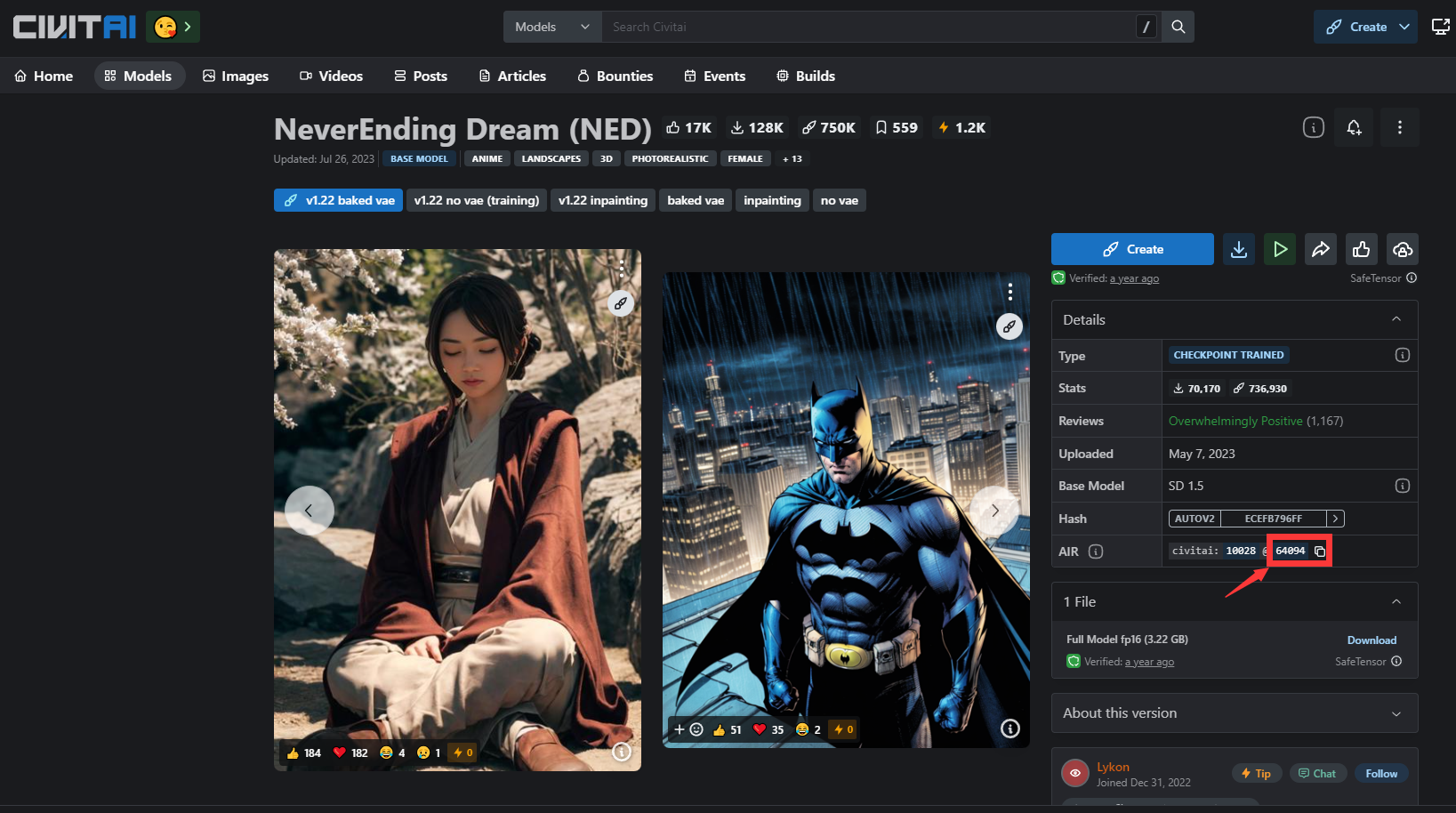
      * Click on a model page on civitai, and copy the version ID from the page.

      <figure><img src="https://2975681513-files.gitbook.io/~/files/v0/b/gitbook-x-prod.appspot.com/o/spaces%2FDtmZwLatyyBFLUK6P6Pj%2Fuploads%2Fgit-blob-602158ba0e0b39bc6e2b006ef51a2bc24359784c%2Fcivitai_model_id.png?alt=media" alt=""><figcaption></figcaption></figure>

      * Example: <https://civitai.com/models/10028?modelVersionId=64094> , use `model = 64094` for this model
  * `prompt`
    * The text prompt for image generation.
    * `Add lora?`

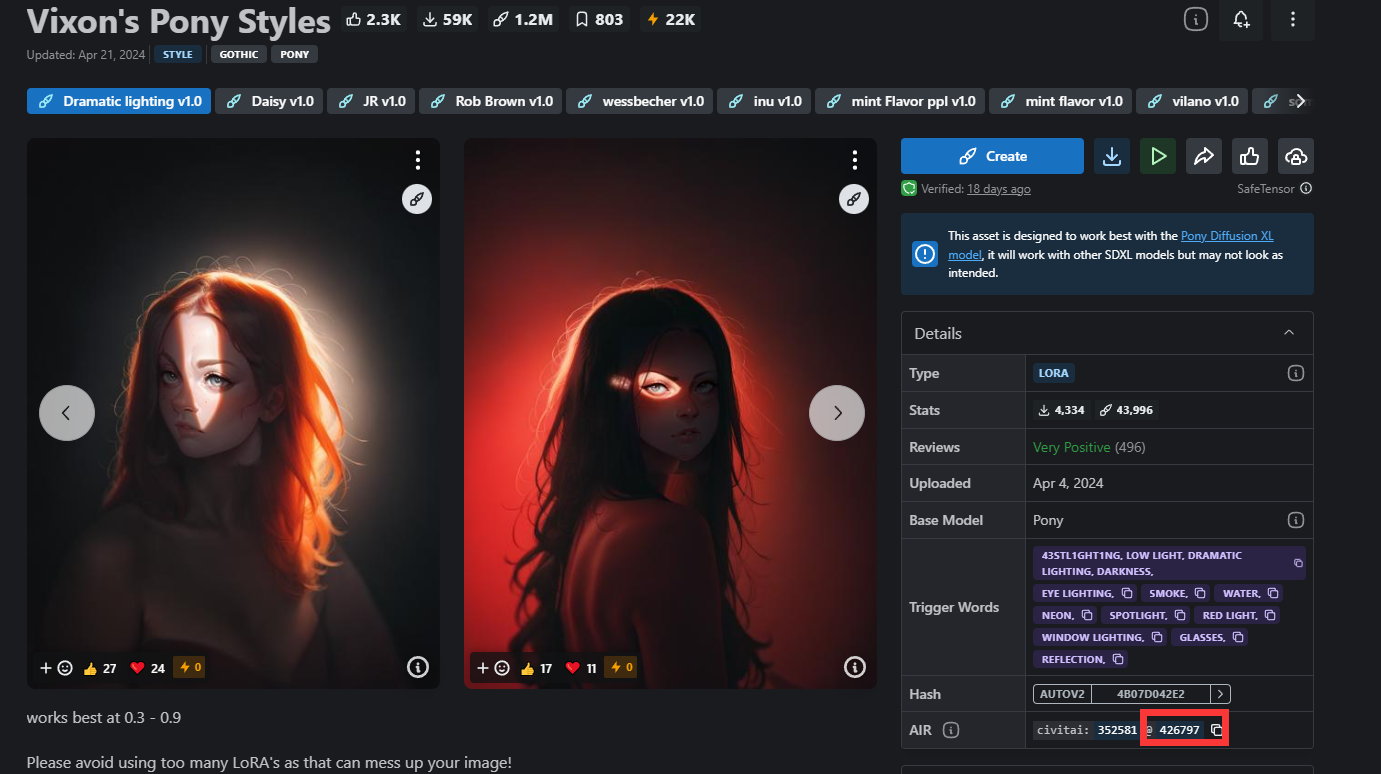
      * add `<lora:$id:$weight>` to your prompt. `$id` is the series number and `$weight` is the lora weight you want (always set to 1.0). You can use multiple loras.

      <figure><img src="https://2975681513-files.gitbook.io/~/files/v0/b/gitbook-x-prod.appspot.com/o/spaces%2FDtmZwLatyyBFLUK6P6Pj%2Fuploads%2Fgit-blob-bf854ec1a21b80eec461c95ab53bd1a245f01e03%2Fcivitai_lora_id.png?alt=media" alt=""><figcaption></figcaption></figure>

      * Example: `<lora:426797:1> A young boy is seated on the ground.`
        * Here, we add `lora=426797` with weight 1 for this generation guided by text `A young boy is seated on the ground`
  * `height & width`
    * The resolution for your generated images.
      * We recommend to generate 512 \* 512 images with SD 1.5 and 1024 \* 1024 images with SDXL 1.0
* Other functional parameter:
  * `enable_hr`: Enable the post-process high resolution. If it is set to false, please ignore the parameter with prefix `hr_`
    * `hr_upscaler`: Model for first step super resolution:
      * Choose from `["None", "Lanczos", "Nearest", "ESRGAN_4x", "LDSR", "R-ESRGAN 4x+", "R-ESRGAN 4x+ Anime6B", "ScuNET GAN", "ScuNET PSNR", "SwinIR 4x"]`
    * `hr_scale` : Improve the image quality by enlarging it in a way while maintains the original ratios. Default to 2.
      * For example, when `enable_hr=True` and `hr_scale=2` , you generated image will be `(2*width, 2*height)`
      * If `hr_height` or `hr_width` is set to a value other than zero, this parameter will be ignored.
    * `hr_resize_x` and `hr_resize_y` : Resize width/height to.
      * 0 means not defined. If x set to 0, and y is not 0, we will resize the length of image to y and change width accordingly. Vice versa
      * For example, when `enable_hr=True` and `hr_resize_x=1024` , and you set the `width=512` to obtain an image with 512 pixels on width. Finally you will get a image with `(1024, 1024/512 * height)`
    * `hr_second_pass_steps`: Steps of sampling for second pass of diffusion model after hires. Set to 0 means the same steps as first pass.
      * Feel free to use 0 for most cases.
    * `hr_denoising_strength`: Strength of image transfomation during hires transform. High means more influence during second pass sampling after hires
      * The weighted sum will be computed based on the images after super-resolution and after the second inference
      * Set 0.7 for default.